



Indoor Golf Simulator Flooring Options: A Practical Buyer’s Guide
The best-looking turf isn’t automatically the best floor for your golf simulator. A surface that feels right underfoot, supports a steady stance, and fits your room layout matters just as much as the finished look. Choosing among indoor golf simulator flooring options takes more than picking a patch of green: you need to plan how the hitting area, stance space, and surrounding floor work together.
If you’re weighing turf against a hitting mat or a layered floor, start with how you’ll use the room, the condition and shape of the base floor, and how the hitting area will meet the surrounding surface. Those details help you choose between broader coverage and clearly defined zones.
This guide compares turf, mats, and modular flooring so you can plan a setup for your room and practice routine. You’ll learn what to measure, how to plan surface transitions, and which layout details to consider before choosing materials. A clear plan makes it easier to discuss product options and installation support.
Key Takeaways
- Compare indoor golf simulator flooring options by coverage, room flexibility, and how the hitting mat meets the surrounding floor.
- Plan around how you’ll use the room, whether it’s dedicated to golf, shared with other activities, or compact.
- Map room dimensions, obstructions, and the simulator footprint before deciding how much flooring each zone needs.
- Consider EverTurf synthetic turf, including EverTurf Putting Green products, as part of a flooring plan shaped around your room and practice goals.
Indoor Golf Simulator Flooring Options: What Does a Complete Setup Need?
A simulator floor includes more than the surface directly beneath the ball. It can cover the hitting area, the golfer’s stance area, and the surrounding floor used to move through the room or make space for other activities. Some setups use one continuous surface; others combine a hitting mat with separate flooring. Both are useful starting points when comparing indoor golf simulator flooring options, because room layouts and priorities differ.
Think of the layout in three parts: the existing base floor, any additional layer, and the visible surface underfoot. Not every setup needs all three. The practical question is how the parts fit together, especially where the hitting area meets the rest of the room. Room use helps determine which components are worth considering: the more activities a space serves, the more carefully its zones need to be planned.
How the hitting zone differs from the rest of the room
The ball-striking area has a different role from the surrounding floor. A dedicated hitting mat can cover that zone, while the stance and walking areas use another surface. This creates a clear division of purpose, but it also means you should plan where the mat will sit and how its edges will meet the adjacent floor.
What a simulator floor should help you accomplish
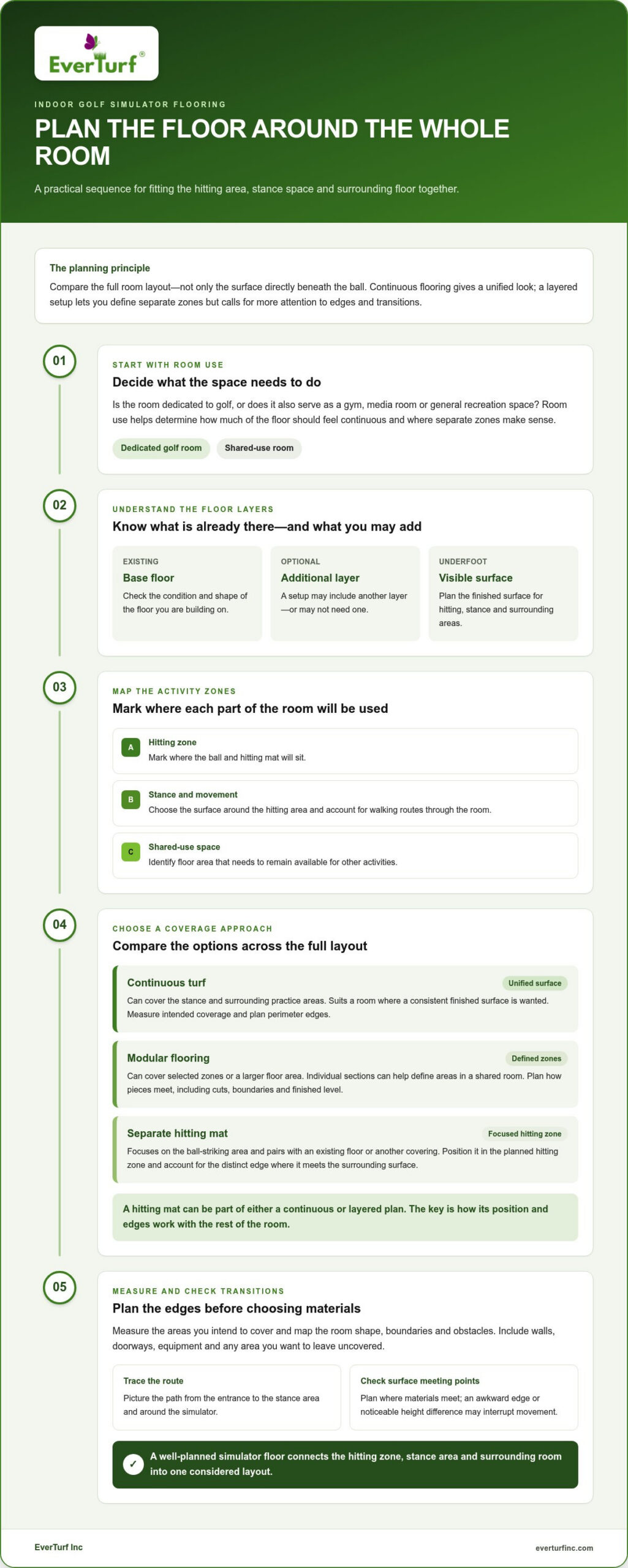
Start with three priorities: a stance area that feels right to you, a floor that suits the room’s other uses, and a finished appearance you’ll enjoy. Consider whether the room is dedicated to golf or also serves as a gym, media room, or general recreation space. Those uses help determine how much of the floor should feel continuous and where separate zones make sense.
For example, a dedicated simulator room may suit a broad, uninterrupted turf look, while a shared room may work better with a defined hitting zone and other floor areas left available for different activities. Artificial turf is one surface to consider; its role depends on your room plan, not appearance alone.
Continuity matters visually and when moving between zones. A change in material can distinguish the hitting area, but an awkward edge or noticeable height difference may interrupt movement. Before choosing components, picture the route from the entrance to the stance area and how you’ll move around the simulator. This keeps the full room in view, rather than focusing only on the mat.
- Hitting zone: Mark where the ball and mat will sit.
- Stance and movement: Decide what surface will surround the hitting area and where people will walk.
- Shared use: Identify any floor space that needs to remain available for other activities.
Once you’ve mapped these zones, compare a continuous surface with a layered setup. Consider how each approach handles coverage, flexibility, and the transition around the hitting mat.
Compare Indoor Golf Simulator Flooring Materials and Layered Setups
There’s no single floor plan for every simulator. Continuous turf, modular flooring, and a separate hitting mat each handle coverage and everyday room use differently. You can also combine them, such as placing a mat in the hitting zone and using another material around it. Compare the whole layout, not just the surface directly beneath the ball.
| Approach | Coverage | Room flexibility | Surface transitions | Installation planning |
|---|---|---|---|---|
| Continuous turf | Can cover the stance and surrounding practice areas | Best suited to a room where a consistent finished surface is wanted | Fewer changes within the covered area, but perimeter edges still need planning | Measure the intended coverage and account for room edges and obstacles |
| Modular flooring | Can cover selected zones or a larger floor area | Individual sections can help define areas in a shared room | Plan how pieces meet each other and other floor materials | Map the layout and consider cuts, boundaries, and the finished level |
| Separate hitting mat | Focuses on the ball-striking area | Pairs with an existing floor or another covering | The mat’s edge creates a distinct transition to the surrounding surface | Position it in the planned hitting zone and consider the space around it |
The main trade-off is simple: continuous flooring creates a unified look, while a layered setup gives you more control over separate zones but requires more attention to edges and transitions. A hitting mat can be part of either plan. The decision is how the components will work together in your room.
Turf across the simulator room
Extending turf beyond the hitting zone creates a consistent surface across stance and practice areas. This may suit a dedicated golf room where a unified green finish is part of the plan. Measure around walls, doorways, equipment, and any area you want to leave uncovered. For context on putting-green applications, see this EverTurf Putting Green guide.
Room shape matters as much as total floor area. A rectangular layout may allow a straightforward coverage plan; alcoves or fixed equipment create boundaries that need careful measuring. When turf is installed, excess is trimmed, so measure the area you intend to cover and show where the finished edges should sit.
Modular flooring, foam tiles, and separate hitting mats
Modular pieces can help outline the simulator zone or distinguish it from a gym or shared-use area. Foam tiles are one example of a modular surface, while rubber flooring is another possible material. A separate hitting mat can then define the ball-striking zone within that larger floor. This layered approach can accommodate distinct zones, but each material boundary needs to be planned.
Before choosing components, consider whether the floor will stay in place or the room needs to change between activities. Decide where the mat will sit and whether its edge will meet the surrounding surface cleanly. Continuous turf has fewer internal boundaries, while modular pieces and separate mats create more distinct zones. EverTurf’s synthetic turf product guidance can help you consider turf as part of a broader room plan.
Which Indoor Golf Simulator Flooring Fits Your Room and Use?
The right indoor golf simulator flooring options depend on how the room works day to day. A dedicated golf space can prioritize a consistent practice environment, while a shared room may need zones for other activities. In a compact layout, every flooring choice needs to work around the simulator footprint, room shape, and available walking space.
Identify your priorities before choosing a material. Do you want continuous turf coverage, flexibility to adapt the room, or a distinct hitting area within an existing floor? Your answers help narrow the layout without assuming one surface suits every golfer.
For a dedicated golf simulator room
If golf is the room’s primary purpose, compare continuous turf with an arrangement that separates the hitting zone from the rest of the practice area. A broad, consistent surface can visually connect those areas. EverTurf supplies synthetic turf and offers product-selection guidance, so you can consider turf in the context of your overall room plan without assuming a product has simulator-specific features.
Picture the room from the entrance and from the stance area. Would a single finished surface make it feel cohesive, or would a separate hitting zone better suit the layout? Account for the simulator and other fixed equipment, since they affect where flooring can extend and where boundaries may be needed. If the room also includes a putting or practice area, consider how it relates visually to the hitting zone.
For a simulator room that serves multiple purposes
In a room shared with a gym, media area, or family activities, separate flooring zones can help define where golf happens and preserve space for other uses. Prioritize the activities you use most, then decide whether the golf surface should stay in place or fit around a room that changes between uses. Plan transitions so the boundaries feel intentional.
A layered arrangement can keep a defined hitting area while the surrounding floor serves another purpose. It also creates more edges to account for, so plan how people will move between zones and where equipment will sit. A continuous surface may feel more unified, but it could cover areas you’d rather keep available for other activities.
For a compact simulator space
In a smaller room, the simulator footprint may take up much of the available floor. Sketch the equipment location and the golfer’s stance area before deciding how much coverage you want. If little space remains for other activities, a focused hitting zone may fit your priorities. If you use the floor for other purposes between sessions, consider how each surface affects movement and usable space.
- Dedicated use: Compare uninterrupted coverage with a distinct hitting and practice area.
- Shared use: Prioritize your most frequent activities, then plan zones and transitions around them.
- Compact room: Start with the equipment footprint and available movement space before choosing coverage.
Room shape matters, too. A long, narrow space may need a different arrangement than a wide room with fixed obstacles. Once you know which activities take priority and where the simulator fits, choose flooring components for the layout you’ll actually use, not just the look you first imagined.
Plan and Measure Your Indoor Golf Simulator Flooring
A simple room sketch makes flooring decisions clearer. Before comparing indoor golf simulator flooring options, record the usable floor area and the simulator’s intended footprint. This gives you a reference for planning coverage, identifying obstacles, and spotting boundaries between materials before installation.
Map the room before choosing a flooring system
Measure the usable floor area and note anything that changes its shape or use. Mark doors, fixed equipment, and other obstructions, then sketch where you expect the hitting, stance, and non-golf zones to sit. The drawing doesn’t need to be to scale, but it should show how each area relates to the room’s edges.
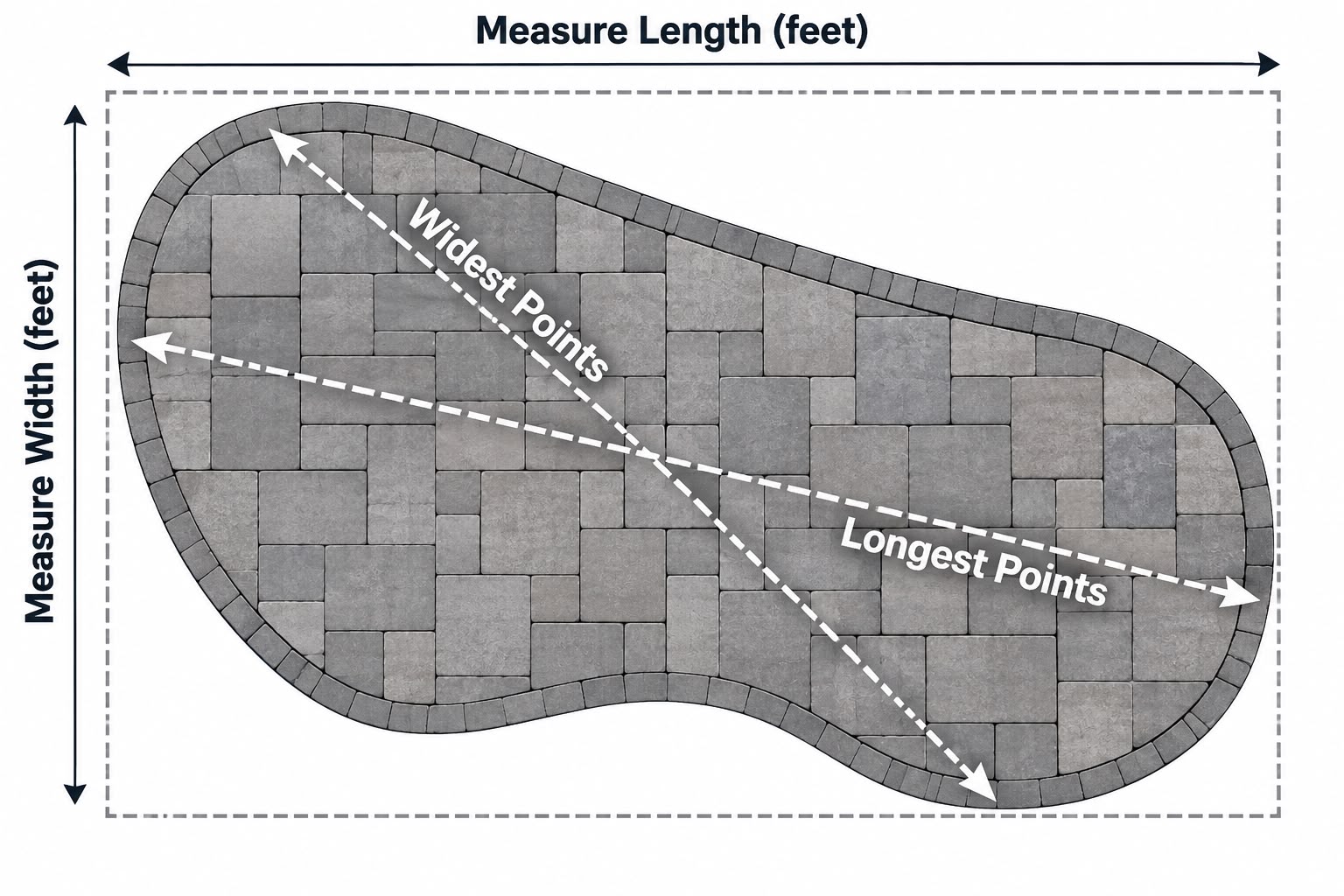
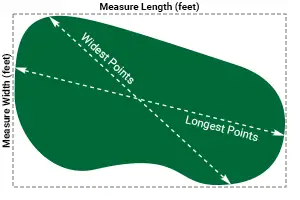
- Map the room. Record the usable width and depth. Use the longest and widest points, and note any irregular outlines.
- Mark the zones. Add the planned hitting area, stance space, walking routes, and any area reserved for other activities.
- Plot the simulator footprint. Show where the equipment will sit in relation to the room and planned golf zones.
- Compare coverage. Sketch continuous turf, modular flooring, or a separate mat within the same layout to see how much of the room each approach covers.
- Review transitions. Mark where flooring will meet walls, equipment, doorways, or another surface, and consider whether each boundary leaves the intended route clear.
For a rectangular turf area, estimate coverage by multiplying its length by its width. If the room has an alcove or an area you plan to leave uncovered, measure the sections separately instead of treating the whole floor as one rectangle. Use your sketch to show the intended coverage. Excess turf is trimmed during installation. For broader context on artificial grass materials and uses, see this artificial grass guide.
Check fit, transitions, and installation needs
Once you’ve mapped the layout, compare your planned coverage with the product information for the materials you’re considering. Review where edges will meet walls, equipment, or adjacent flooring, and whether the arrangement fits the room’s shape. These details turn a rough idea into a more useful project plan.
Keep your measurements and sketch together when discussing product choices. Include the room width and depth, obstacles, simulator footprint, preferred coverage, and any separate zones. EverTurf offers a free project quote and consultation to help plan around those requirements. Learn more through EverTurf’s project quote and consultation.
Choose a Turf Option with EverTurf Product Guidance
A well-planned floor starts with the room, not a product label. Consider how often the space is used for golf, where the hitting zone sits, and whether you want turf across the room or only in selected areas. Those priorities help you decide whether synthetic turf belongs in a continuous surface or as one part of a layered layout.
When synthetic turf belongs in the flooring plan
Synthetic turf is one option for a simulator space. Your room plan determines how much coverage makes sense: you might want turf across a larger practice area or prefer to define a specific zone within a floor used for other purposes. Compare the look and layout you want while keeping both the hitting area and surrounding floor in view.
EverTurf supplies synthetic turf, including EverTurf Putting Green and EverTurf Putting Green Pro. Consider these as part of a broader flooring plan, without assuming they have simulator-specific features. EverTurf’s product-selection guidance can help you relate your intended coverage and room use to available turf choices. If your plan includes infill, the EverTurf turf infill guide provides additional material context.
Before settling on a direction, gather the details that explain your goals. A room sketch, the intended simulator footprint, and notes on which areas you want covered can make a product discussion more useful. To measure turf, calculate the area by multiplying length by width. Excess turf is trimmed during installation.
Get help matching a turf choice to your project
EverTurf offers product-selection guidance, DIY installation support, and professional installation. Share how you plan to use the room, where the hitting and stance zones will sit, and whether you prefer broad turf coverage or a defined turf area. These details help shape the project around your priorities.
- Room use: Describe whether the space is dedicated to golf or shared.
- Coverage: Note which areas you want to finish with turf.
- Layout: Include the room dimensions, obstructions, and simulator footprint.
- Installation: Say whether you’re considering DIY support or professional installation.
With those details ready, you can move from comparing flooring approaches to discussing a turf plan for your space. EverTurf responds to quote requests within 24 hours. Request a free quote and project consultation.
Build a Simulator Space That Feels Like Yours
Your simulator room should support the way you want to practice and feel at home in the rest of your space. Let your routine guide the final choice: picture stepping in for a quick session, sharing the room with family, or using a dedicated golf space. That vision can help you decide how much turf belongs in the room and where a distinct hitting area makes sense.
With your room plan ready, you can compare indoor golf simulator flooring options with a clearer sense of what matters. EverTurf offers synthetic turf choices, product-selection guidance, and installation support to help you develop a considered project plan.
When you’re ready, request a free quote and project consultation to start planning a simulator space around your room and practice routine.
Frequently Asked Questions
What is the best flooring for an indoor golf simulator?
The best indoor golf simulator flooring options depend on your room, hitting-zone needs, and whether the space serves other purposes. Turf can create a continuous surface, modular flooring can mark selected areas, and a separate hitting mat can sit within another floor. For a dedicated golf room, broader coverage may suit your priorities. In a shared space, compare how each arrangement fits alongside your other activities.
Can you use artificial turf for an indoor golf simulator?
Yes, synthetic turf can be considered as a flooring surface in a simulator room. Decide whether you want it across the stance and practice areas or only in selected zones, then plan how the hitting area fits beside it. A dedicated mat can remain a separate component. Choose based on the product information rather than assuming a turf product has particular simulator-related characteristics.
Do you need a hitting mat with indoor golf simulator flooring?
Not necessarily. The room’s flooring and the ball-striking surface serve different roles, so a hitting mat can be one component of a larger plan rather than a replacement for all other flooring. For example, you might position a dedicated mat within a turf-covered or modular area. Mark its location on your room plan and consider how it meets the surrounding surface.
How do you measure a room for indoor golf simulator flooring?
Measure the usable floor area using its longest and widest points, then note doors, fixed equipment, and other features that affect coverage. Mark the intended hitting, stance, and non-golf zones so your measurements match the planned layout. For a rectangular turf area, multiply its length by its width to estimate the area. Excess turf is trimmed during installation, so include the full area you intend to cover.
Can an indoor golf simulator share a room with a home gym?
Yes, a simulator and home gym can share a room if the layout accounts for both activities. Mark where the hitting area and gym equipment will sit, and plan how you’ll move between them. Compare turf, modular flooring, and a separate mat based on the activities you use most often. Pay attention to surface transitions so the zones feel deliberately arranged rather than crowded together.
What should you consider before choosing simulator flooring?
Start with room dimensions and the locations of the hitting and stance zones. Then consider other activities, how much of the floor you want covered, and where different surfaces will meet. Equipment, doorways, and room edges can all shape the layout. Comparing these details first helps you choose a material and configuration that fits your intended use, rather than selecting a surface by appearance alone.